BlueGuard temperature controllers, DC temperature controllers, DC heating temperature controllers, DC power supply temperature controllers, 24V DC temperature controllers, 12V DC temperature controllers, DC constant temperature controllers, DC heating modules, DC temperature control systems, DC PID temperature control, DC fan control, DC heating element control, industrial DC temperature controllers, vehicle-mounted DC temperature controllers, battery DC temperature controllers, DC equipment temperature controllers, low-voltage temperature controllers, DC constant temperature modules, portable temperature controllers, DC environmental temperature control systems.
Products
product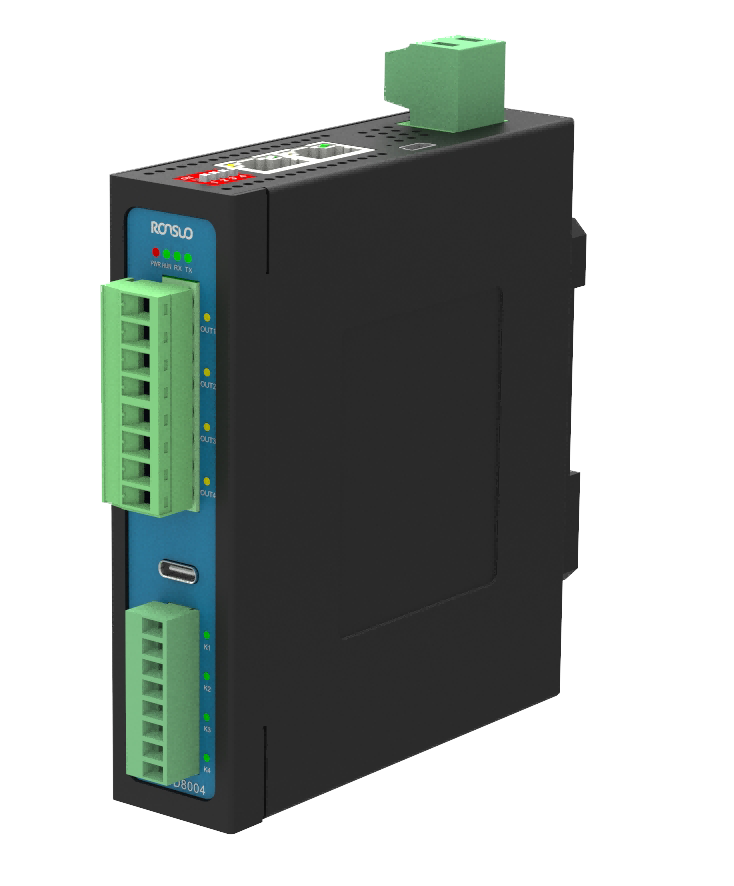
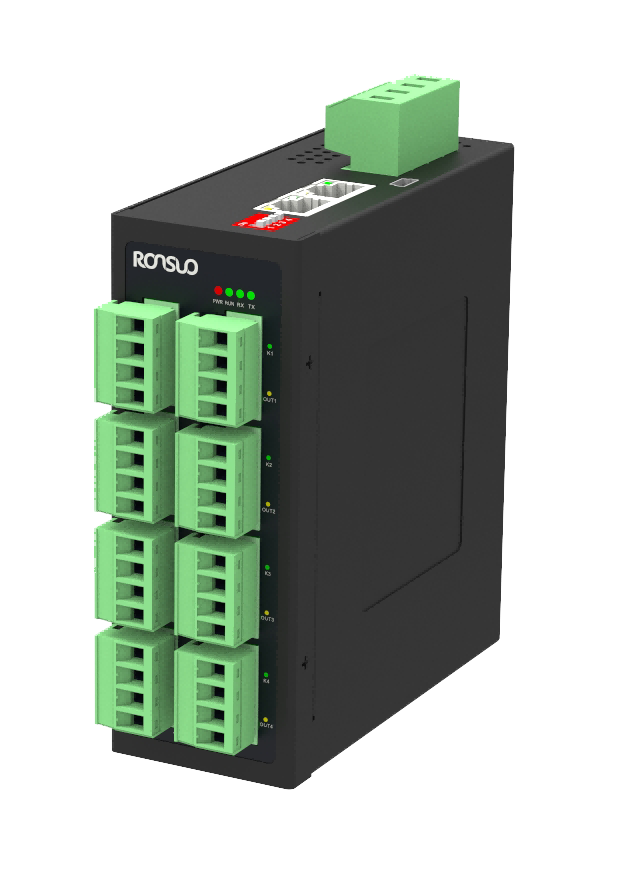
 Product Intro
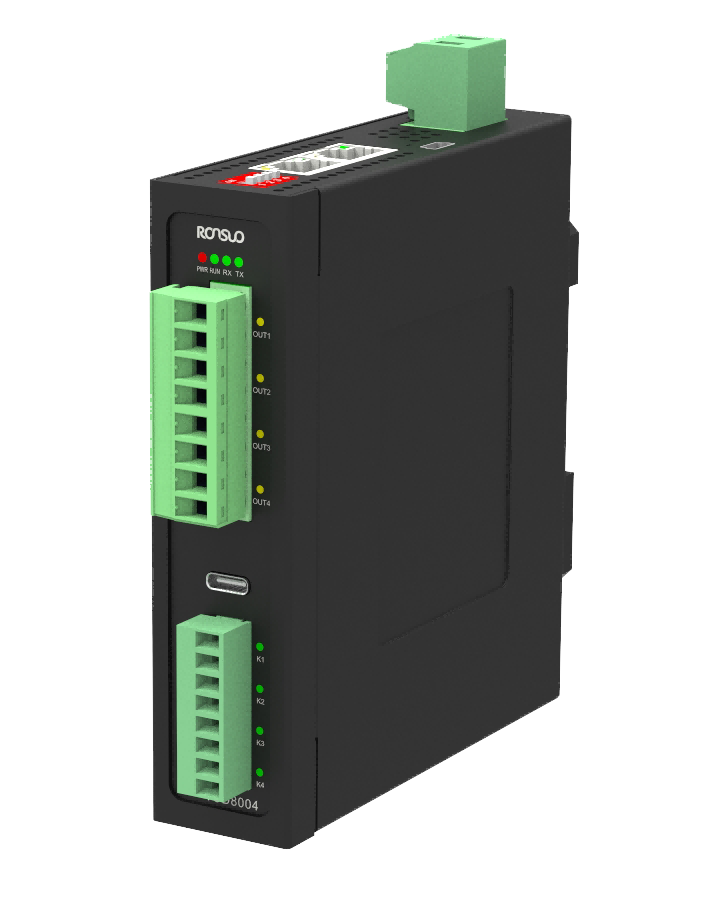
This integrated DC temperature controller combines temperature acquisition and DC temperature output into one unit, directly driving DC loads without the need for external data acquisition devices or solid-state relays. It features a built-in PID algorithm for precise output control. Supporting one uplink Ethernet port and two RS485 communication channels, it can connect up to 15 slave devices in parallel, using the Modbus TCP/RTU protocol. It boasts high stability, strong anti-interference capabilities, and over-temperature protection, ensuring safe and reliable operation.
 News
News
Product overview
The integrated DC thermostat integrates temperature acquisition and DC temperature control output, allowing direct connection to DC loads without the need for external data collectors or solid-state relays. The thermostat calculates proportional PID output values based on the acquired temperature value (PV) and setpoint (SV). It can control heating power devices through various output modes to achieve temperature control. The device's host computer provides one 100M uplink network interface for connection to a host computer and one downlink RS485 interface for connection to slave devices. The slave device supports two RS485 interfaces, one for connecting to the host computer and one for connecting to downlink slave devices, supporting up to 15 slave devices in parallel. The device communicates using the standard Modbus TCP/RTU protocol.
The device features precise temperature control, excellent stability, strong anti-interference capabilities, and multi-level over-temperature protection. The system includes built-in functions such as output cessation upon over-temperature alarm and output shutdown upon exceeding the control temperature upper limit, effectively protecting the safety of the controlled items.
Device model list
| Serial number | name | model | illustrate |
|---|---|---|---|
| 1 | Integrated DC temperature controler | TUD8004 | Host: 4-way K/N/E/J/T type temperature acquisition, 4-way DC control output, can be directly connected to DC load. Uplink 100M Ethernet interface, downlink RS485 interface, can be expanded to connect to slave devices, DIN35 rail installation |
| 2 | TUD8104 | Slave: 4-way K/N/E/J/T temperature acquisition, 4-way DC control output, can be directly connected to DC load. Uplink RS485 interface (connected to the host), DIN35 rail installation |
Product features
Industrial design
⚫ High-performance industrial-grade 32-bit processor
⚫ Supports long-term stable operation in the -20~85℃ range
⚫ Metal casing, resistant to electromagnetic interference
Reliability and stability
⚫ A watchdog timer ensures long-term system stability
⚫ A comprehensive protection mechanism ensures device stability
⚫ Built-in surge and ESD protection for the power supply and RS485 interface
⚫ Reverse polarity protection for the input power interface and short-circuit protection for load output channels
Ease of use
⚫ The device supports standard DIN35 rail mounting.
⚫ Plug-and-play terminal blocks are used for easy maintenance.
⚫ Plug-and-play operation is supported, eliminating the need for complex configuration.
⚫ Communication utilizes standard Modbus TCP/RTU protocol.
⚫ A Type-C debug port is provided on the host for easy debugging.
⚫ Configuration management is supported via host software (TSC).
Product features
⚫ Supports 4 channels of thermocouple temperature acquisition and 4 channels of control output (can be directly connected to DC loads)
⚫ Supports the Modbus TCP/RTU standard protocol and function codes 01, 03, 05, 06, 15, and 16
⚫ The thermostat supports 100M Ethernet upstream communication and RS485 downstream communication with up to 15 slave devices
⚫ The RS485 communication interface uses a standard network cable for direct connection, making installation easy and optically isolated
⚫ The thermostat supports standard DIN35 rail mounting for easy installation, with a compact design and minimal footprint
⚫ The thermostat features open PID parameter settings, supporting independent PID settings for each channel
⚫ The device features multiple over-temperature protection mechanisms and a load output disconnection alarm
⚫ Temperature control accuracy ≤±0.5°C, temperature acquisition accuracy ≤±1.0°C, and a resolution of 0.01°C
Technical Parameters
The integrated DC thermostat (TUD8x04) series includes two models: TUD8004 and TUD8104. Detailed thermostat parameters are as follows.
| TUD8x04 Temperature controller technical parameters | |||||
|---|---|---|---|---|---|
| project | TUD8004 | TUD8104 | |||
| Equipment power supply | mode of connect-ion | 2P-7.62 Terminal,current capacity 40A | |||
| working voltage | 24VDC(12~36V) | ||||
| module dissipation | ≤1W(no output) | ||||
| Power protection | Surge protection,static protection,reverse pr-otection | ||||
| Host-to-host Eth- ernet communica- tion | interface type | Standard RJ45 network port | |||
| Number of netw- ork ports | 1A RJ45 network port | ||||
| protocol | Standard Modbus TCP/RTU,support 01,03,05,06,15,16 function codes | ||||
| Network port sp-eed | 10/100Mbps,adaptive MDI/MDIX | ||||
| transmission dist-ance | ≤100m | ||||
| Default parameters | Communication:Modbus TCP,port:502 IP:192.168.1.21 mask:255.255.255.0 Gateway:192.168.1.1 | ||||
| Host down RS485 communication and slave up/down RS485 communic- ation | interface type | Standard RJ45 port (used for RS485 communi-cation) | |||
| Number of interf-aces | 1A RJ45 port | 2 A RJ45 port | |||
| protocol | Standard Modbus-RTU protocol,supports 01,03,05,06,15,16 function codes | ||||
| communication mode | Down 485 Commun-ications | Up/down 485 commu- nications | |||
| | eters | Checkbit:no,databit:8,stopbit:1 |
| transmissiondist- ance | ≤100m | |
| isolationmethod | Photoelectricisolation | |
| Portprotection | electrostaticprotection | |
| Collectionchannels | modeofconnect- ion | 3.96Terminal(2Pperchannel) |
| | Sensortype | SupportsK/N/E/J/Ttype,default:Ktype |
| Numberofacqui- | 4channel | |
| | ||
| sitionchannels | ||
| samplingperiod | ≤100ms | |
| Measuringrange | 0.1Accuracy:K/N/Jtype(0~1200℃),Etype(0~ | |
| | ||
| 1000℃),Ttype(0~400℃) | ||
| | ||
| 0.01Accuracy:K/N/E/Jtype(0~650℃),Ttype(0~ | ||
| | ||
| 400℃) | ||
| resolutionratio | 0.1℃or0.01℃canbeset,default:0.01 | |
| outgoingchannel | interfacetype | 3.81Terminal(2Pperchannel) |
| Numberofoutput | 4channel | |
| | ||
| channels | ||
| Outputtype | PWMswitchingmode | |
| loadcurrent | ≤10A/channel(canbedirectlyconnectedtoDC | |
| | ||
| load) | ||
| Outputprotection | Shortcircuitprotection,opencircuitalarmdetec- | |
| | ||
| tion | ||
| designfeature | Shellmaterial | HightemperatureresistantflameretardantPC |
| waytoinstall | StandardDIN55guiderailinstallation | |
| productsize | High136mm*wide30mm*deep122mm | |
| serviceenviron- | workingtemper- | -20~85℃ |
| | | |
| ment | ature | |
| | Storagetemper- | -20~105℃ |
| | | |
| | ature | |
| | Humidityatwork | 10~95%(nocondensation) |
| functionaldescr- | pilotlamp | Powerindicatorlight,operationindicatorlight, |
| | | |
| iption | serialportreceive/transmitindicatorlight,input/ | |
| | | |
| | outputindicatorlight |
| | Alertinstructions | Whenanalarmisdetected,itcanbeobtained throughtheindicatorlightdisplayorbyreadinga specifiedregister |
| Self-adjustment | Allchannelssupportindependentself-adjustment | |
| PIDcontrol | AllchannelssupportindependentsettingofSV valueandindependentPIDcontrol | |
| Temperatureco- ntrolaccuracy | ≤±0.5℃ | |
| Combinationap- plications | Thehostsupportstheuseofseparatetemperature control,andtheslavemachinesupportstheuseof thehosttemperaturecontrol |
Device interface function.
Thermostat Interface Definition and Description
| number | definition | explain |
|---|---|---|
| 01 | Panel LOGO and indicator lights | RONSUO:BrandLOGO PWR(red): Power indicator light, the device is powered on and always lit RUN (green/red): Status indicator light, the green light flashes when normal, the red light flashes when alarm RX (green): The device flashes when receiving data TX(green): The device flashes when sending data Model: TUD8x04 (x=0 is the host ,x =1 is the slave )T1~T4: Keep on when the input sensor detects valid signal C1~C4: Light up when the output signal is valid |
| 02 | Output channel terminals | Control output 85.08 terminals (see2.3.5) Supports 4 load outputs |
| 03 | debugging inte- rface | USB: TYPE- C debugging interface (default 921600,N,8,1), only the host supports |
| 04 | Collection cha- nnel terminal | Temperature collection 8-bit 3.96 terminal (see2.3.5) Supports 4 thermocouple type temperature acquisition |
| 05 | Power inputte- rminals | 2 Terminal7.62(see2.3.2) Supports 40A overcurrent capacity |
| 06 | 485 and power terminals | M4 screw terminal (connecttoearth) |
| 07 | Firmware upgr- adeinterface | Mini USB interface for firmware upgrades |
| 08 | RJ45 interface | Standard RJ45 interface (see2.3.3) Host: 1 for uplink 100M Ethernet communication and 1 for downlink 485 communication Receiver: Both are used for 485 up/down communication |
| 09 | Bud code switch | 4 Position code switch (see2.3.4) Host: The fourth bit of the device IP address is incremented (0~15) Server: Set the address of the device station (address0~ 15), and set the minimum valueto 1. Valid |
| 10 | Label informat- ion nameplate | Print equipment basic information, such as model, power supply, working temperature and so on |
| 11 | Guide rail moun-tingclip | Standard DIN55 guide rail installation and fixing clip position |
Common faults
During device use, some faults may occur, and the user can restore the normal operation of the
device according to the faults and solutions listed below. If the problem cannot be solved, please contact our company.
Power Failure
Symptom: After powering on, all panel indicators are off.
Troubleshooting:
1. Check the power supply wiring for proper connection and contact with the terminals.
2. Check the power cable for reverse polarity.
3. Use a multimeter to measure the input voltage to ensure it is within the specified range (12-36 VDC).
Communication Failure
Symptom: RS485 communication failure
Troubleshooting:
1. Check the device parameters for correct configuration.
2. Check the panel indicators for correct display.
3. Check the communication wiring for correct configuration. After ensuring the wiring is correct, check the communication parameters for correct configuration.
4. Check the 485 DIP switch address for the correct communication address with the host computer.
Abnormal Temperature Acquisition
Symptom: Abnormal Temperature Acquisition
Troubleshooting:
1. Check the temperature sensor wiring for correct connection.
2. Check the terminal blocks for tightness and no looseness.
3. Check the temperature sensor for proper contact with the object being measured. 4. Check that the connected temperature sensor model matches the device model.
5. Check that the register address and quantity read by the host computer are correct.
Messages
News

Email: 616526410@qq.com

Hotline: 13609016130

Address: Room 314, 3rd Floor, No. 9, Kemulang South Road, Tianhe District, Guangzhou

Filing No.: 粤ICP备2023092377号-3
Products
 Temperature controller Temperature acquisition device Industrial I/O Modules Industrial gateway Power Regulator
 Solutions
Semiconductor/Chip Industry New energy/energy storage industry Optoelectronics/Display Industry Rubber/Plastics Industry Biopharmaceutical industry Industrial Furnaces/Thermal Industry Mechanical Automation Industry Other integrated applications Support
Manuals
Tutorials
Tools
News
Company News Exhibition News Media Information




 Location:
  Products


