TEC Temperature Controllers: Semiconductor Refrigeration Temperature Controllers, Blue Guardian Temperature Controllers, Thermoelectric Refrigeration Temperature Controllers, Thermocouple Temperature Controller Modules, Peltier Temperature Controllers (±0.01℃), Precision Temperature Control, Optical Module Temperature Controllers, Laser Temperature Controllers, LD Temperature Drivers, Optical Communication Temperature Control Systems, Optoelectronic Device Temperature Control, TEC Constant Temperature Controllers, Bidirectional Cooling and Thermal Control, PID Precision Temperature Control, Temperature Closed-Loop Control, Multi-Channel TEC Control, LD/PD Test Temperature Control, Optical Device Aging Test, Optical Lens Aging Temperature Control, High-Speed Optical Module Test, TEC Current Drivers, Constant Temperature Platform Controllers, MEMS Device Temperature Control, LiDAR Temperature Control, Medical Equipment Temperature Control, Laboratory Precision Temperature Control, Thermopile Temperature Control Units, Dual-Loop PID Temperature Control, Temperature Acquisition + Control Integrated 8-Channel TEC Temperature Controllers, TTD Series Temperature Controllers, Low-Noise Temperature Controllers, 485 Communication Temperature Controllers, Ethernet Temperature Control Equipment, Optimized Temperature Control Algorithm, TEC Protection Functions, Steady-State Temperature Control, Fast Temperature Control Response, Optoelectronic Industry Temperature Control. Precision component temperature control system
Products
product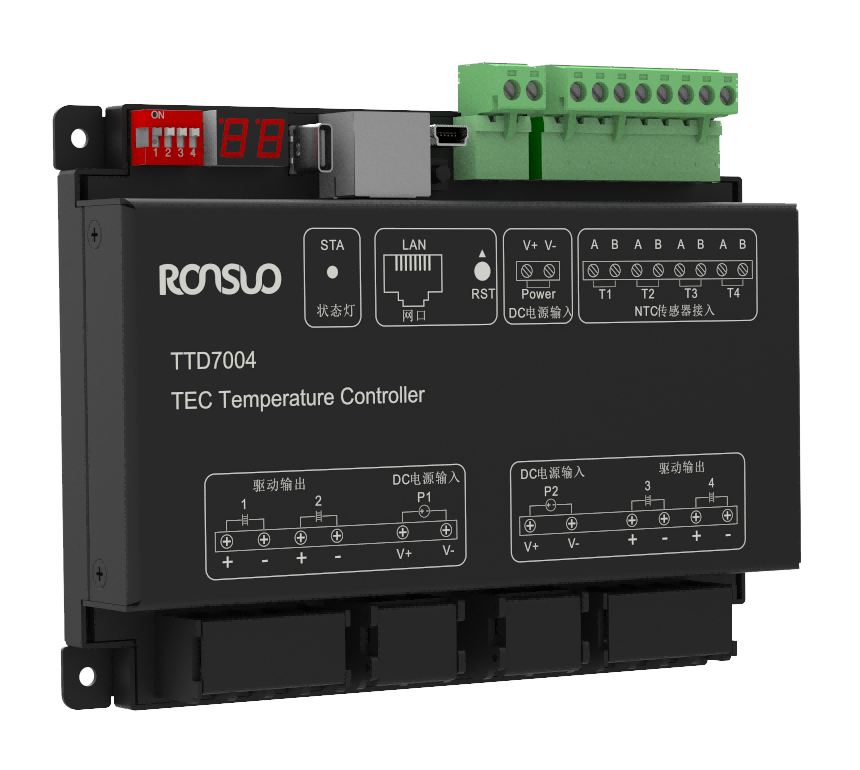

 Product Intro
The TTD70xx is a network-type 2/4/8-channel TEC temperature controller. It supports 1/2/4/8 channels of NTC thermistor temperature sensor input, 2/4/8 channels of cooling and heating output, and has a rated output current of up to 10-15A. The output is divided into two groups, each supporting 4-30V input, which can easily drive TECs of different power and voltage. It provides one upstream Ethernet interface and supports the standard Modbus TCP protocol.
 News
News
Product overview
The TEC thermostat is a highly integrated temperature control device that combines temperature acquisition with bidirectional DC temperature control output. It can directly drive DC loads (such as TEC cooling elements), eliminating the cumbersome process of connecting external temperature sensors and solid-state relays. Based on the real-time acquired temperature value (PV) and the user-set target value (SV), the thermostat intelligently calculates PID control ratios and intelligently adjusts the output of the cooling/heating power devices using PWM to achieve precise temperature control. Furthermore, the device is equipped with a 100Mbps high-speed network interface for easy connection to a host computer and supports standard Modbus TCP/RTU communication protocols, ensuring efficient and compatible data transmission.
The device features precise temperature control, excellent stability, strong anti-interference capabilities, and multi-level over-temperature protection. The system includes built-in functions such as output cessation upon over-temperature alarm and output shutdown upon exceeding the control temperature upper limit, effectively protecting the safety of controlled items.
Device model list
| 序号 | 名称 | 型号 | 说明 |
|---|---|---|---|
| 1 | TEC temperature controller | TTD7004 | Integrated 4-channel NTC temperature acquisition, 4-channel 15A DC load output (TEC cooling plate). Uplink 100M Ethernet Modbus TCP communication, screw fixed installation |
Product features
Industrial design
⚫ High-performance industrial-grade 32-bit processor
⚫ Supports long-term stable operation in the -20~85℃ range
⚫ Aluminum alloy housing, resistant to electromagnetic interference
Reliability and stability
⚫ A watchdog timer ensures long-term system stability
⚫ A comprehensive protection mechanism ensures device stability
⚫ Built-in surge and ESD protection on the power input
⚫ Reverse polarity protection on the input power port and short-circuit protection on the load output channel
Ease of use
⚫ Device temperature acquisition uses pluggable terminals for easy maintenance
⚫ Plug-and-play support, eliminating the need for complex configuration
⚫ Communication uses the standard Modbus TCP/RTU protocol
⚫ A Type-C debug port on the front of the host facilitates debugging
⚫ Supports configuration management via host computer software (TSC)
Product features
⚫ Supports 4-channel NTC temperature acquisition and 4-channel control output (can directly connect to TEC cooling DC loads)
⚫ Supports Modbus TCP/RTU standard protocol and function codes 01, 03, 05, 06, 15, and 16
⚫ The thermostat host supports 100M Ethernet uplink communication
⚫ The thermostat's multi-channel design ensures a compact footprint
⚫ The thermostat features open PID parameter settings, supporting independent PID settings for each channel
⚫ The device features multiple over-temperature protection mechanisms and a load output disconnection alarm
⚫ Temperature control accuracy ≤±0.1°C, temperature accuracy ≤±0.5°C, and a resolution of 0.01°C
Technical Parameters
| TTD7004 Temperature controller technical parameters | |||
|---|---|---|---|
| project | parameter | ||
| Equipment power supply | mode of connection | 2P-3.81 Terminal blocks | |
| working voltage | 24VDC(12~36V) | ||
| module dissipation | ≤1.5W(static) | ||
| Power protection | Surge protection, static protection ,reverse protection | ||
| UpstreamEthernet communication | interfacetype | Standard RJ45 network port | |
| Number of network ports | 1individual | ||
| communicating protocol | StandardModbusTCP/RTU,support 01,03,05,06,15,16functioncodes | ||
| Networkportspeed | 100Mbps | ||
| transmissiondist- ance | ≤100m | ||
| Defaultparameters | Communication: Modbus TCP,port:502 IP:192.168.1.21 mask:255.255.255.0 Gateway:192.168.1.1 | ||
| Collection channels | mode of connection | 8P/5.08terminal blocks(2P per channel) | |
| Sensor type | NTC resistance (customizable scale),default: NTC10K-B3950 | ||
| Number of acquisi- tionchannels | 4channel | ||
| sampling period | ≤100ms | ||
| Measuring range | -60~150℃ | ||
| Measuring tempe- | ≤±02℃ | ||
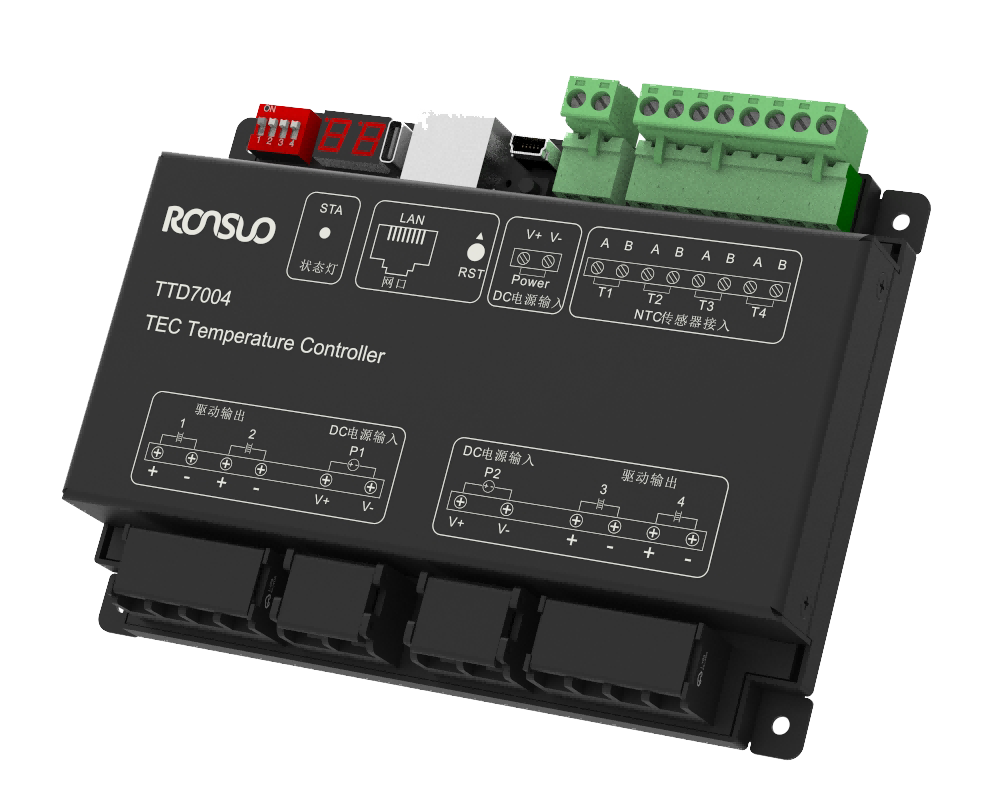
Device interface function.
TEC Thermostat Interface Definition and Description
| number | definition | explain |
| 01 | Bud code switch | 4 Position. code switch (see2.3.4) Set the fourth bit of the IP address to increase (0~15) |
| Digitaltubedis- play | Display device alarm code (see3.3) | |
| TYPE-Cinterface | debugging interface | |
| RJ45 interface | Ethernet uplink communication interface (see2.3.3) | |
| reset button | Long press for 3-5 seconds to restore the device to factory Settings | |
| Equipment po- wer input | 2P-5.08 Equipment power supply terminals (see2.3.2) | |
| NTC sensor acc-ess | NTC access. (see2.3.5) T1: NTC sensor interface for channel 1 T2: NTC sensor interface for the second channe l T3: NTC sensor interface for channel 3 T4: NTC sensor interface for channel 4 | |
| 02 | Panel screenpr- inting | Indicate the external interface of the device with a silk screen logo |
| 03 | Loadpowerin- put | Load power input (see2.3.5) P1: Load input power supply 1,for the first half of the load output P2: Load input power supply 2, for the 3 / 4 load output |
| 04 | Drive outputs | Load access (see2.3.5) 4 Road TEC refrigeration load. access |
| 05 | Install screw ho-les | 4 An Φ 3.5 installation and fixing hole |
| 06 | landing | Install fixed screw hole position and equipment grounding (PE) |
Device port function
Common faults
During device use, some faults may occur, and the user can restore the normal operation of the
device according to the faults and solutions listed below. If the problem cannot be solved, please contact our company.
Power Failure
Symptom: After powering on, all panel indicators are off.
Troubleshooting:
1. Check the power supply wiring for proper connection and contact with the terminals.
2. Check the power cable for reverse polarity.
3. Use a multimeter to measure the input voltage to ensure it is within the specified range (12-36 VDC).
Communication Failure
Symptom: RS485 communication failure
Troubleshooting:
1. Check the device parameters for correct configuration.
2. Check the panel indicators for correct display.
3. Check the communication wiring for correct configuration. After ensuring the wiring is correct, check the communication parameters for correct configuration.
4. Check the 485 DIP switch address for the correct communication address with the host computer.
Abnormal Temperature Acquisition
Symptom: Abnormal Temperature Acquisition
Troubleshooting:
1. Check the temperature sensor wiring for correct connection.
2. Check the terminal blocks for tightness and no looseness.
3. Check the temperature sensor for proper contact with the object being measured. 4. Check that the connected temperature sensor model matches the device model.
5. Check that the register address and quantity read by the host computer are correct.
Messages
News

Email: 616526410@qq.com

Hotline: 13609016130

Address: Room 314, 3rd Floor, No. 9, Kemulang South Road, Tianhe District, Guangzhou

Filing No.: 粤ICP备2023092377号-3
Products
 Temperature controller Temperature acquisition device Industrial I/O Modules Industrial gateway Power Regulator
 Solutions
Semiconductor/Chip Industry New energy/energy storage industry Optoelectronics/Display Industry Rubber/Plastics Industry Biopharmaceutical industry Industrial Furnaces/Thermal Industry Mechanical Automation Industry Other integrated applications Support
Manuals
Tutorials
Tools
News
Company News Exhibition News Media Information




 Location:
  Products


